> ## Documentation Index
> Fetch the complete documentation index at: https://openops-ecb4f397-ops-4802-mcp-server-docs.mintlify.site/llms.txt
> Use this file to discover all available pages before exploring further.
# AWS IAM Role Creation
> How to set up AWS roles for OpenOps using CloudFormation or Terraform
OpenOps provides infrastructure-as-code templates to create IAM roles in your AWS account with the necessary permissions to connect to your AWS resources. Two roles are available: the **OpenOpsApp role** for running workflows, and the **Benchmark role** for running cost optimization benchmarks.
## OpenOpsApp Role
Creates the `OpenOpsApp` role with permissions to run workflows from the OpenOps template catalog. The template contains all the read permissions needed to execute all templates in our library; you can still restrict the scope to the permissions needed for the templates you are actually running. Write permissions are optional and only needed if you want to apply remediation actions directly to cloud resources.
The role can be created with either [AWS CloudFormation](https://docs.aws.amazon.com/AWSCloudFormation/latest/UserGuide/Welcome.html) or [Terraform](https://developer.hashicorp.com/terraform) - both produce the same role and permissions.
Besides the IAM role, the template by default also sets up cost management resources: it creates an S3 bucket (`openops-cur-`) and a [Cost and Usage Report](https://docs.aws.amazon.com/cur/latest/userguide/what-is-cur.html) definition that continuously exports billing reports to that bucket.
This is why the role **must** be created in the `us-east-1` region as CUR is only available there. If you don't want these resources, disable the `CostUsageReport` parameter (CloudFormation) or set `cost_usage_report = false` (Terraform); the template then creates IAM resources only and can be deployed in any region.
### Using CloudFormation
**[Create OpenOpsApp stack](https://console.aws.amazon.com/cloudformation/home#/stacks/new?stackName=OpenOpsApp\&templateURL=https://openops.s3.us-east-2.amazonaws.com/OpenOpsAppRoleStack.yml)** | [Download template](https://openops.s3.us-east-2.amazonaws.com/OpenOpsAppRoleStack.yml)
**Parameters:** AWS account ID (required), `CostUsageReport` (optional, default `true`), permission sets (optional)
1. Click the **Create OpenOpsApp stack** link above.
2. On the **Specify stack details** page, enter the required parameters, then click **Next**.
3. On the **Configure stack options** page, click **Next**.
4. On the **Review and create** page, scroll down to the **Capabilities** section and acknowledge the creation of IAM roles:
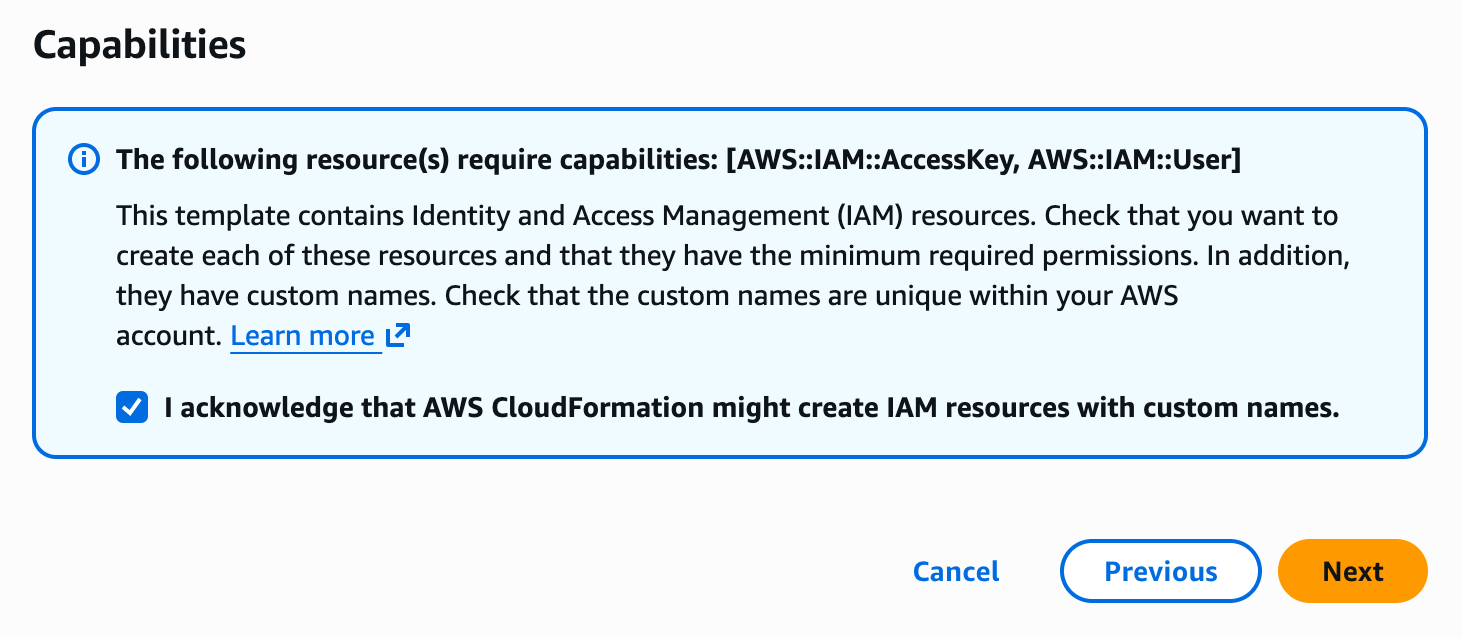 5. Click **Submit**. The stack will be created with the configured permissions.
### Using Terraform
**[Download template](https://openops.s3.us-east-2.amazonaws.com/OpenOpsAppRole.tf)** | [View on GitHub](https://github.com/openops-cloud/cloudformation-examples/tree/main/openops-app-role-aws/terraform)
**Variables:** `aws_account_id` (required), `external_id` (optional), `role_name` (optional, default `OpenOpsApp`), `cost_usage_report` (optional, default `true`), permission toggles (optional)
Download the template into an empty directory and apply it:
```bash theme={null}
mkdir openops-role && cd openops-role
curl -O https://openops.s3.us-east-2.amazonaws.com/OpenOpsAppRole.tf
terraform init
terraform apply -var 'aws_account_id='
```
Replace `` with the ID of the AWS account where your OpenOps environment is deployed - the account that will assume the role.
The template can also be consumed as a Terraform module, which makes it easy to roll the role out across many AWS accounts. See the template's [README](https://github.com/openops-cloud/cloudformation-examples/tree/main/openops-app-role-aws/terraform#multi-account-rollout) for details.
## Benchmark Role Stack
Creates a read-only `OpenOpsBenchmarkRole` specifically for running AWS cost optimization benchmarks. Includes Compute Optimizer permissions, resource read access (EC2, RDS, ELB, DynamoDB, CloudWatch, Cost Explorer, CloudTrail), and Pricing API access. This role is available as a CloudFormation template.
**[Create Benchmark stack](https://console.aws.amazon.com/cloudformation/home#/stacks/new?stackName=OpenOpsBenchmark\&templateURL=https://openops.s3.us-east-2.amazonaws.com/OpenOpsBenchmarkRoleStack.yml)** | [Download template](https://openops.s3.us-east-2.amazonaws.com/OpenOpsBenchmarkRoleStack.yml) | [View on GitHub](https://github.com/openops-cloud/cloudformation-examples/tree/main/aws-benchmark-permissions)
**Parameters:** TrustedAccountId (required), ExternalId (optional, recommended for security)
To install, click the **Create Benchmark stack** link above and follow the same steps as for the [OpenOpsApp stack](#using-cloudformation). The Benchmark stack can be created in any region.
## Modification
You're welcome to download any of the templates and modify specific permissions according to your needs. Notice that some AWS components in OpenOps workflows may not function properly as a result.
## Support
Feel free to join our [Slack community](https://slack.openops.com) if you have any questions or need help with your installation.
5. Click **Submit**. The stack will be created with the configured permissions.
### Using Terraform
**[Download template](https://openops.s3.us-east-2.amazonaws.com/OpenOpsAppRole.tf)** | [View on GitHub](https://github.com/openops-cloud/cloudformation-examples/tree/main/openops-app-role-aws/terraform)
**Variables:** `aws_account_id` (required), `external_id` (optional), `role_name` (optional, default `OpenOpsApp`), `cost_usage_report` (optional, default `true`), permission toggles (optional)
Download the template into an empty directory and apply it:
```bash theme={null}
mkdir openops-role && cd openops-role
curl -O https://openops.s3.us-east-2.amazonaws.com/OpenOpsAppRole.tf
terraform init
terraform apply -var 'aws_account_id='
```
Replace `` with the ID of the AWS account where your OpenOps environment is deployed - the account that will assume the role.
The template can also be consumed as a Terraform module, which makes it easy to roll the role out across many AWS accounts. See the template's [README](https://github.com/openops-cloud/cloudformation-examples/tree/main/openops-app-role-aws/terraform#multi-account-rollout) for details.
## Benchmark Role Stack
Creates a read-only `OpenOpsBenchmarkRole` specifically for running AWS cost optimization benchmarks. Includes Compute Optimizer permissions, resource read access (EC2, RDS, ELB, DynamoDB, CloudWatch, Cost Explorer, CloudTrail), and Pricing API access. This role is available as a CloudFormation template.
**[Create Benchmark stack](https://console.aws.amazon.com/cloudformation/home#/stacks/new?stackName=OpenOpsBenchmark\&templateURL=https://openops.s3.us-east-2.amazonaws.com/OpenOpsBenchmarkRoleStack.yml)** | [Download template](https://openops.s3.us-east-2.amazonaws.com/OpenOpsBenchmarkRoleStack.yml) | [View on GitHub](https://github.com/openops-cloud/cloudformation-examples/tree/main/aws-benchmark-permissions)
**Parameters:** TrustedAccountId (required), ExternalId (optional, recommended for security)
To install, click the **Create Benchmark stack** link above and follow the same steps as for the [OpenOpsApp stack](#using-cloudformation). The Benchmark stack can be created in any region.
## Modification
You're welcome to download any of the templates and modify specific permissions according to your needs. Notice that some AWS components in OpenOps workflows may not function properly as a result.
## Support
Feel free to join our [Slack community](https://slack.openops.com) if you have any questions or need help with your installation.